
Build a CNFans Spreadsheet field card before you order
A field card is a short checklist for one kind of item: what to look for on the catalogue card, what to confirm on the listing, what to check again in the warehouse photos and what to ask the agent. Build one here, then keep it open in another tab while you shop.
Home / Field card
Field card builder
Twelve aisles are covered. Each card mixes a few checks that apply to everything with marks specific to the aisle and to the priorities you tick. The search words underneath are links to catalogue searches; the number beside each is how many results that word returned when we ran it.
Field card: Jackets
On the card
- Write down the item number: the digits after w- in the card address
- Note which variant in the cover photo you want, by position and colour
- Collar fabric differs from the body or matches it
- Count the front pockets and note their shape
- Cover shows several colours: note the one you want by position
On the listing
- Open every gallery photo, not only the cover
- Match each option name or number to its own small photo
In warehouse photos
- Size label or option code matches what you ordered
- No stains, pulled threads or loose seams in any shot
- Pockets, collar and cuffs match your card notes
- Colour under room light still reads as the option you chose
Ask the agent
- Ask for one extra close-up of the detail you care about most
Search words for this aisle
Working the builder, click by click
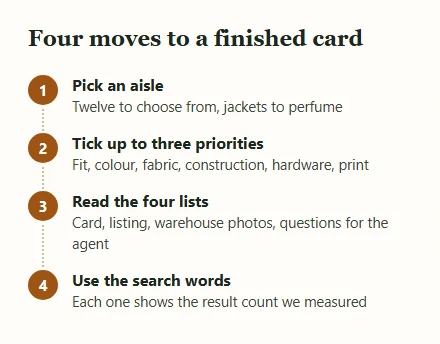
Choose the aisle first, because the marks differ more between aisles than between items within one. A jacket is judged by its collar, pockets and closure; a pair of joggers by its cuffs, cord and waistband; a bag by its strap anchors and inside. The builder starts on jackets, with construction and colour ticked, so you can see a finished card before touching anything.
Then tick up to three priorities. They narrow the aisle's marks to the ones that matter to you, while a short set of checks that apply to every item always stays on the card: the item number, every gallery photo, the size label in the warehouse shots. If you tick nothing, you get every mark for the aisle, which is a good way to learn what the aisle rewards checking.
The card rebuilds the moment you change a choice. Nothing is sent anywhere: the data sits in the page, and closing the tab clears it.
Pairing the search box with the aisle cards
This site has two ways into the catalogue, and they suit different moments. The aisle cards on the Spreadsheet page suit the moment when the type of item is settled but the exact style is not; you scan photos, and your eye does the filtering. The search box at the top of the home page is for when you can name a detail.
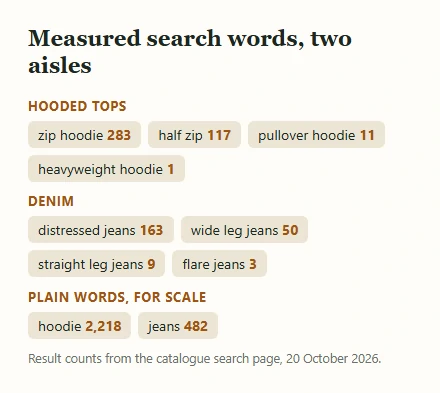
Here is how to use the search box well: type the field mark, not the brand or the category. A plain word such as hoodie
returned 2,218 results on 20 October 2026; half zip
returned 117 and pullover hoodie
11. If a mark returns nothing, go back to the aisle and look for it in the photos instead. The builder's word list gives you tested starting points for each aisle, so you are not guessing at spellings sellers use.
One caution: a search matches title words, and titles sometimes describe the cover rather than every option. Always confirm the mark on the listing itself.
Printing or saving your card
Two buttons sit under every card. Copy as text
puts a plain checklist on your clipboard, with square brackets you can tick in a notes app or paste into the order note you send the agent. Print
opens your browser's print dialogue with everything except the card hidden, so one page comes out with the four lists and the search words.
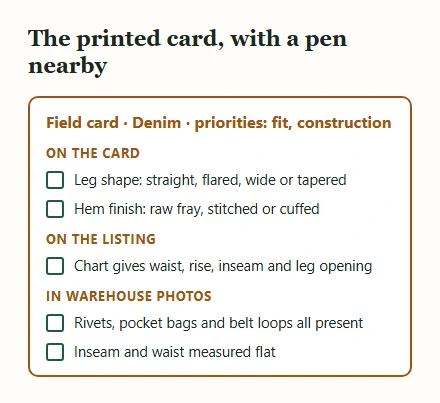
Printing sounds old-fashioned, but it works well for the warehouse stage: lay the printout next to your screen, go down the list with a pen while you zoom into each photo, and note anything that needs a question. A ticked paper list is also a useful record if a dispute comes up later, because it shows what you checked and when.
If you shop for the same kind of item often, save the copied text with the item numbers you bought. Over a few orders it becomes your own reference for what a good listing looks like in that aisle.
What a checklist cannot catch
Things a card cannot tell you
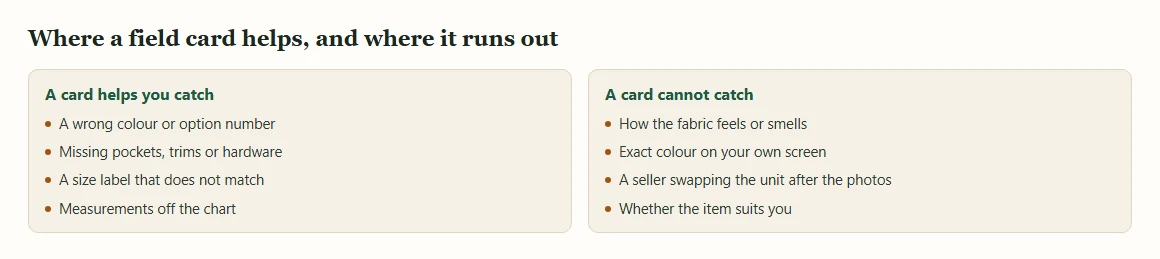
A field card helps you look carefully; it does not make a photo tell the whole truth. Feel, smell and weight do not survive photography. Colour shifts between the seller's studio, the warehouse lamp and your own screen. A seller can photograph one unit and post another, and no list of marks prevents that; it only makes it easier to notice.
Things only you can decide
The card cannot judge whether a price is fair, whether a seller deserves your trust or whether an item suits you. Those calls rest on the listing, on the shop's other items and on your own taste. Our pages on choosing sellers and reading listings give you more to go on, and cautions before you pay covers the mistakes no checklist will stop if you rush.