CNFans Spreadsheet guide to warehouse photos and quality checks
The warehouse photos are the only pictures anyone takes of the exact unit you bought, and they arrive while there is still time to act. This page covers how to read QC photos against the notes you made from the catalogue card, and how to ask for more when the photos leave a question open.
Home / Photos & QC
Why the warehouse photographs your items
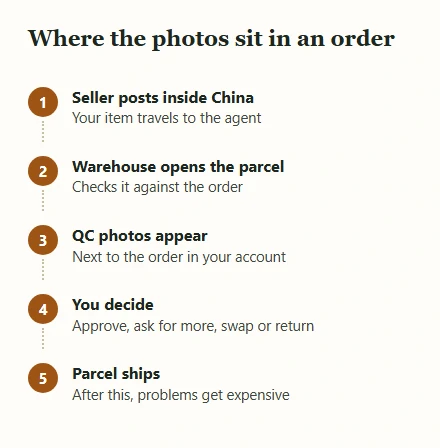
Arrival photos, often called QC photos, help compare the received item with your saved option and order. The historical CNFans homepage named this stage QC&storage. Check the current service description for the included views, any measurement request and extra charges before relying on the inspection.
A quality check is a record, not a verdict. The photographer is confirming that the right thing arrived in reasonable condition; they are not grading the fabric or comparing it with a shop window. That is your job, and the photos give you the material for it.
The timing is what makes them valuable. Until your parcel ships, a wrong colour, a flaw or a size mix-up can usually be sorted out with the seller through the agent. After it ships, the same problem becomes a return across borders, which is slow, costly and sometimes impossible.
Matching warehouse photos to your field card
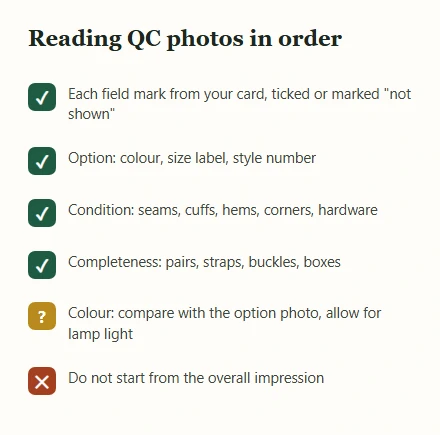
Here is how to read QC photos without missing the obvious. Open your notes or field card and go through it in the order you wrote it, ticking each mark against a photo rather than against your memory of the listing. If a mark is not visible in any photo, write not shown
rather than assuming it is fine.
Then run three checks that apply to everything. First the option: colour, size label, style number or code, exactly as ordered. Mix-ups between neighbouring options are the commonest error and the easiest to fix if caught now. Second, condition: stains, pulled threads, glue marks, loose buttons, scratched hardware. Zoom in on seams, cuffs, hems and corners, where problems hide. Third, completeness: both shoes, the belt and its buckle, the bag's strap, the dust cover or box if the listing showed one.
Only after that look at the overall impression. If you start there, a good first impression tends to wave everything else through.
Measurements, colour and the light in the room
Measurements
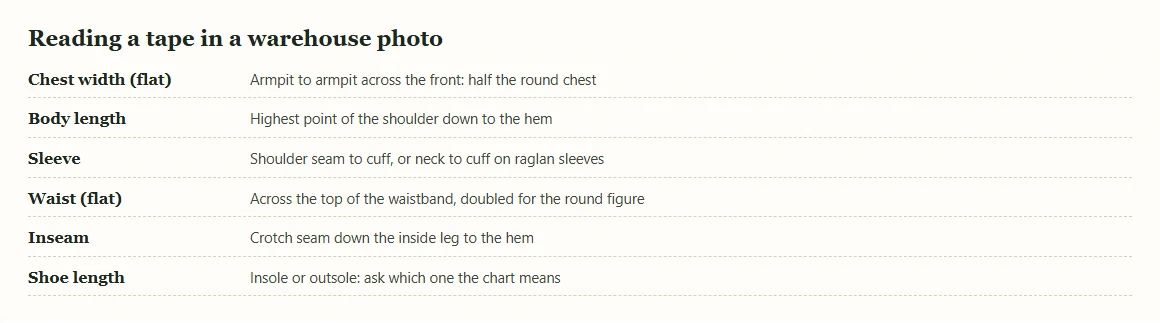
A tape in the photo is worth more than any size label, but only if you read it the same way the seller's chart was written. Chest width is usually measured flat from armpit to armpit, so it is half the round measurement. Body length on a top starts where the shoulder meets the collar and ends at the hem; on trousers the inseam runs from the crotch seam to the hem. Compare the tape with the listing's chart, not with a different brand's size, and ask for a second shot if the tape is slack or angled.
Colour
Warehouse photos are taken under ceiling lights, often on a grey or white table, with little or no editing. Studio covers are lit and retouched. Expect warehouse colours to look duller and sometimes warmer or greener than the cover. The useful comparison is with the small option photo for your colour on the listing, because both show the same product with less styling. If you are still unsure, ask for a photo beside something white, which gives your eye a reference.
Texture and weight are the hardest things to judge. Ask for a close-up with the fabric folded, or held against the light, when they matter.
Asking for another photo, an exchange or a return
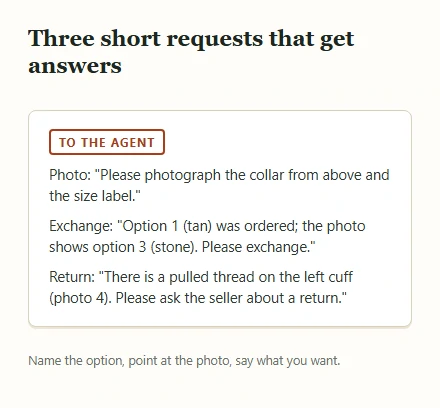
If something is unclear, ask for another photo before deciding anything else. Be specific: please photograph the collar from above
works; please check quality
does not. Whether extra photos cost anything is part of the agent's terms, so check them when cnfans.com is back.
If the photo shows a real problem, say which kind it is. A wrong option is the seller's error and is usually corrected by an exchange. A flaw may justify a return or a partial refund, depending on the seller and the agent's terms. A difference you simply do not like is your call rather than an error, and sellers on Chinese marketplaces treat those differently from faults.
Write your request in plain, short sentences, attach or reference the photo, and keep a copy. Returns inside China often involve postage back to the seller and a time limit, so act on the day the photos appear rather than letting them sit.
Keeping a record of each check
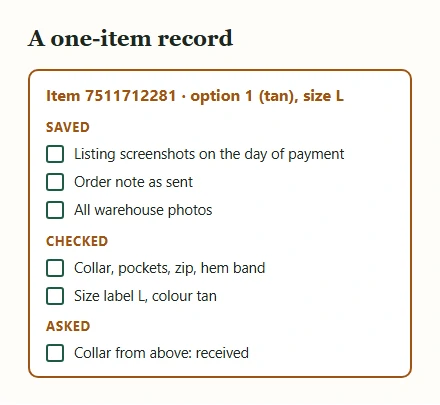
Save the warehouse photos the moment they appear. Agent accounts can archive old orders, sellers can change listings, and a dispute weeks later goes far better with the photos, your field card and the listing as it was on the day you paid.
A record needs only a few things: the item number, the option you ordered, the date the photos arrived, what you checked, and what you asked for. Our field card's copy button produces a plain checklist you can paste into a note and tick. Keep the order note you sent the agent, too, because it proves which option you asked for.
The same record helps your next order. After three or four purchases in one aisle, your notes show which marks predicted a good result and which were noise, and that is the closest thing to expertise this hobby offers. Keep the records somewhere you will find them again, not only in a chat history.
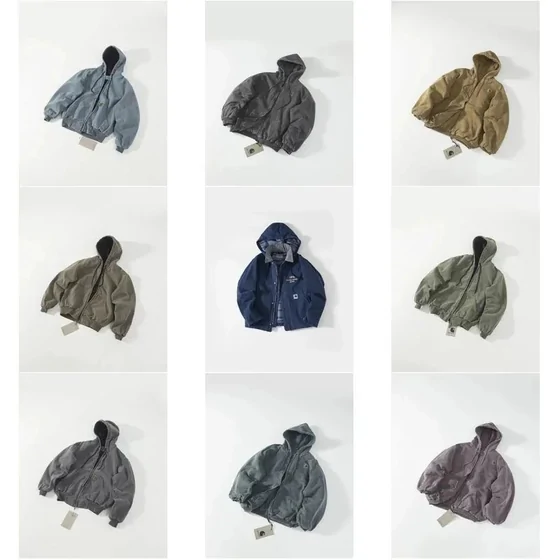
A nine-option cover needs a one-option check
The cover below places nine jackets in a grid. They differ in colour, and the centre jacket is open while several others are closed. A buyer can use those visible features to describe an option, but the cover contains no measurement of the piece that will arrive.
- Record the menu label. “Middle blue jacket” is a useful reminder for you; the seller’s option name is the instruction the agent needs.
- Compare like with like. Ask for a front view with the zip closed if that is needed to compare the pocket arrangement. A change of pose can hide a feature without changing the product.
- Resolve the unknown. Request a size label and flat measurement separately. The spacing of nine images is a page layout, not a scale.
This is a seller reference image, not a CNFans warehouse photo. In your own order, pair the saved option image with the arrival photo and note “matches”, “differs” or “not visible” for each relevant detail. “Not visible” should trigger a question, not an automatic approval.